Frequently Asked Questions:
What is CSU Fully Online?
CSU Fully Online is a concurrent enrollment program that allows CSU students totake one online course at another CSU campus during the fall or spring semester along with coursework at their home CSU campus. The additional units through CSU Fully Online are included in the full-time tuition.
The home campus is the CSU campus where the student is admitted and currently attending. The host campus is the campus offering the CSU Fully Online course.
Who is eligible?
Current CSU students* who are enrolled in full-time tuition units, more than 6 units, and have paid full-time tuition or pending financial aid covering tuition are eligible. In addition, students must have completed at least one term at their home CSU campus and earned 12 units with a minimum 2.0 GPA. Incoming transfer students are eligible to participate their first semester at the CSU.
*International and graduate students are not automatically eligible. Check with your home campus to confirm eligibility. Students enrolled through Extended/Continuing Education are not eligible. Those programs are under a different tuition structure and do not pay systemwide state tuition.Cal Poly students are not eligible due to quarter calendar. See Eligibility section below for more information.
When can I register?
Fall 2024 enrollment for CSU Fully Online opens on July 1, 2024. Your home CSU campus will activate the Enroll in CSU Fully Online link/icon on your Student Center which will be available up through the date set by the home CSU. See the Fall 2024 Home Campus Enrollment Dates for your campus dates.
Bakersfield
| 07/01/24 - 08/22/2024
|
Channel Islands
| 07/01/24 - 08/30/2024 |
| Chico | 07/01/24 - Contact campus |
| Dominguez Hills | 07/01/24 - Contact campus |
| East Bay | 07/01/24 - 08/30/2024 |
| Fresno | 07/01/24 - Contact campus |
| Fullerton | 07/01/24 - Contact campus |
| Humboldt | 07/01/24 - 09/09/2024 |
| Long Beach | 07/01/24 - 09/09/2024 |
| Los Angeles | 07/01/24 - 09/04/2024 |
| Monterey Bay | 07/01/24 - 09/09/2024 |
| Northridge | 07/01/24 - 08/31/2024 |
| Pomona | 07/01/24 - 08/30/2024 |
| Sacramento | 07/01/24 - 09/06/2024 |
| San Bernardino | 07/01/24 - 08/23/2024 |
| San Diego | 07/01/24 - 09/09/2024 |
| San Francisco | 07/01/24 - 09/01/2024 |
| San Jose | 07/01/24 - Contact campus |
| San Marcos | 07/01/24 - 08/30/2024 |
| Sonoma | 07/01/24 - Contact campus |
| Stanislaus | 07/01/24 - 09/04/2024 |
| Maritime | 07/01/24 - Contact campus |
Are all the courses on the schedule available?
Course availability is based on the host campus enrollment dates and available seats.
An enrollment request can only be submitted for a course that is open (available seats) and within the enrollment dates set by the host campus.
CourseMatch courses are a subset of courses that open on the first day of the enrollment period (July 1, 2024) and have reserved seats for visitor students. Those are indicated on the course schedule listed at
www.csufullyonline.com with a star symbol. All other online courses are available on a space available basis during the enrollment window set by the host campus. To improve system performance when searching for classes in the enrollment portal, enter the associated campus code along with the course or class information.
| 35 | Bakersfield | 08/01/24 - 08/22/2024 |
| 73 | Channel Islands | 08/01/24 - 08/30/2024 |
| 20 | Chico | 08/14/24 - 08/28/2024 |
| 55 | Dominguez Hills | 08/12/24 - 08/30/2024 |
| 5 | East Bay | 08/01/24 - 08/24/2024 |
| 25 | Fresno | 08/07/24 - 08/28/2024 |
| 50 | Fullerton | 08/12/24 - 08/30/2024 |
| 30 | Humboldt | 08/01/24 - 08/30/2024 |
| 40 | Long Beach | 08/01/24 - 09/09/2024 |
| 45 | Los Angeles | 08/06/24 - 09/04/2024 |
| 6 | Monterey Bay | 08/09/24 - 09/01/2024 |
| 70 | Northridge | 08/12/24 - 08/31/2024 |
| 10 | Pomona | 08/05/24 – 08/30/2024 |
| 60 | Sacramento | 08/01/24 - 09/06/2024 |
| 63 | San Bernardino | 08/12/24 - 08/23/2024 |
| 65 | San Diego | 08/19/24 - 09/02/2024 |
| 75 | San Francisco | 08/01/24 - 09/01/2024 |
| 80 | San Jose | 08/01/24 - 08/20/2024 |
| 68 | San Marcos | 08/01/24 - 08/30/2024 |
| 85 | Sonoma | 08/01/24 - 09/01/2024 |
| 90 | Stanislaus | 08/01/24 - 08/19/2024 |
Is CSU Fully Online available for summer?
CSU Fully Online is only available fall and spring semesters, terms where students pay full-time tuition. Enrollment in summer courses is done directly through the host campus
Open University division. Per-unit tuition charges apply. Official transcripts are required to transfer credit back to home campus.
Can I change to a degree program that is offered completely online?
Current CSU students can check with their campus advisor to find out what options are available at their campus. To transfer to an online degree program offered at another CSU campus you must apply for admission.
You can search online degrees at
online.calstate.edu. under the degrees area. You can also search on the degrees.calstate.edu website by selecting Online under delivery format.
Are international students eligible for Fully Online?
International students may be eligible to participate. Visa restrictions may not allow online study. Students should check with their home campus to confirm their eligibility. The additional per unit nonresident fees apply to the Fully Online course and are paid to the host campus.
Can graduate students take courses through CSU Fully Online?
Graduate student participation is up to the home campus. Since most graduate programs don't allow transfer credit unless by petition, the home campus may limit participation and authorize enrollment to meet prerequisites or a pre-approved course for transfer. If the campus allows, they may set up requirements differently from the standard eligibility rules for undergraduates for which this program was designed. The host campus may restrict enrollment to only their students or require department approval before authorizing enrollment. To make it work takes extra initiative on the student's part and assistance from a graduate advisor.
I'm a part-time student. Can I participate?
Part-time participation in CSU Fully Online may be authorized by the home campus on a case by case basis. If an exception is approved, the CSU Fully Online units are combined with your home campus units to verify your tuition charges.The total enrolled units must stay at 6 units to have the CSU Fully Online course included in part-time tuition. If combined unit totals more than 6 units, full-time tuition is charged.
I’m a Cal Poly student, why can’t I participate in CSU Fully Online?
Concurrent enrollment is not permitted between campuses on different term calendars. Cal Poly is the only campus on the quarter system so there are no options for cross-enrollment through CSU Fully Online.
Students can consider the Intersystem Cross Enrollment program with a UC campus that is on the quarter calendar. Your campus website briefly mentions this program. The following UC website may be helpful to identify potential courses: https://search.uconline.edu/. Enrollment would be arranged between the UC campus and Cal Poly SLO via an enrollment form.
I'm not a CSU student. Can I take an online class?
If you are not a current CSU student you enroll directly through the host CSU campus Open University as a visitor student. Per-unit tuition charges apply. Financial aid is not available. If you know the campus that is hosting the course you are looking to take, you can search their
Open University website for information on cost and how to enroll.
How do I find a match to a specific course or requirement at my campus?
Use the search functionality on the posted schedule at
www.csufullyonline.com. There you can search by course subject code, keyword, GE or pre-approved course at your home campus. The results will always default to open courses only.
Note: CSU to CSU course equivalencies are available if the course was previously reviewed or transferred. The number of course equivalencies may be limited. Specific course/requirement credit may not be available but does not mean the course is denied.
Online Course search box allows you to type in a course or subject code to filter the course list.
Example: Search available Communications department courses by entering COM or COMM. Campuses may code their subjects differently, so it is recommended to use varying abbreviations to pick up all potential options. Using COM you will see COM, COMS, MCOMM, COMD, COMM and HCOM subjects.

Online Course Title search box allows you to enter in a course title or keyword from the title to search potential courses. Try a variation of keywords to identify possible matches.
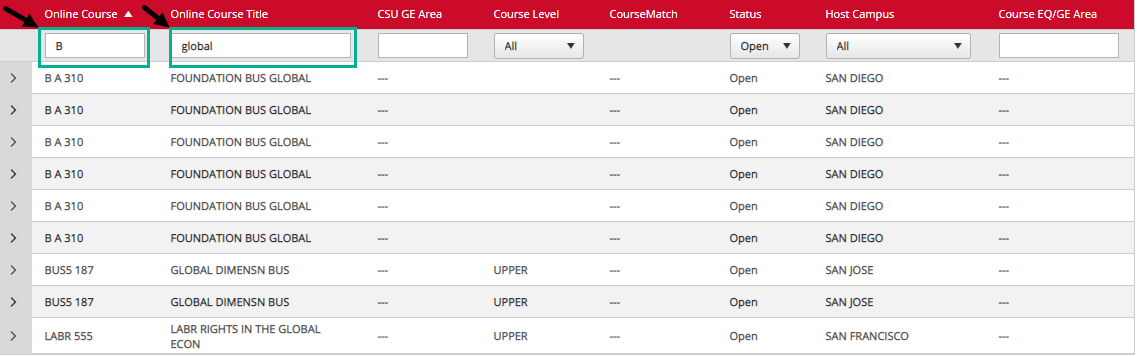
Example 1: Search using keyword 'abnormal'

Example 2: Search using keyword 'global' brings up a listing of courses under a number of subjects. Adding partial subject or even a letter to the Online Course box to filter results by both course and course title.
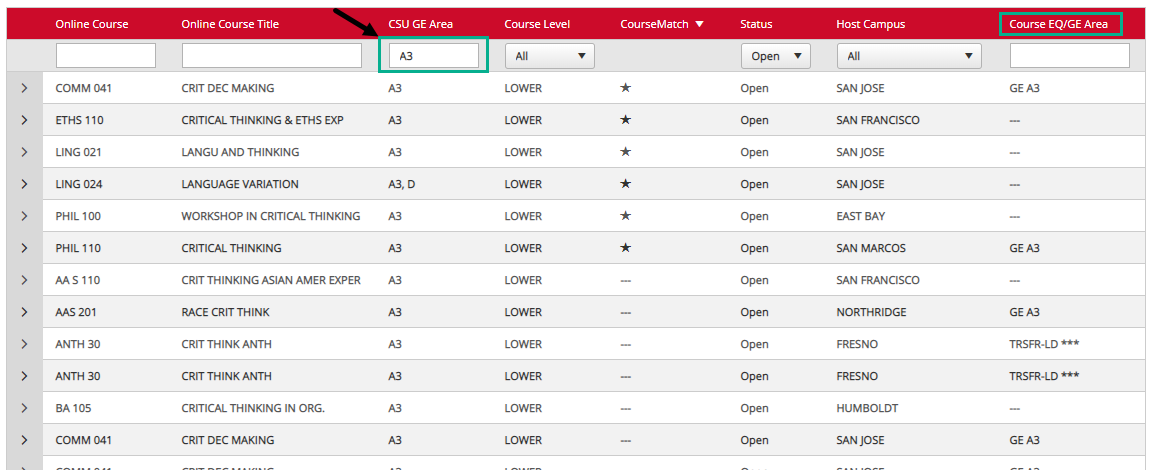
CSU GE Area: This column displays the systemwide GE area assigned by the host campus for their courses. The home CSU campus should honor that same GE area upon transfer. Even if the Course EQ/GE Area column is blank.
Example 1: A3 is entered in the CSU GE Area search box. Results show a number of available courses, some with and some without Course EQ/GE Area designated. Results on this example are sorted by CourseMatch (*) courses which open early and have reserved seats for CSU Fully Online enrollment.
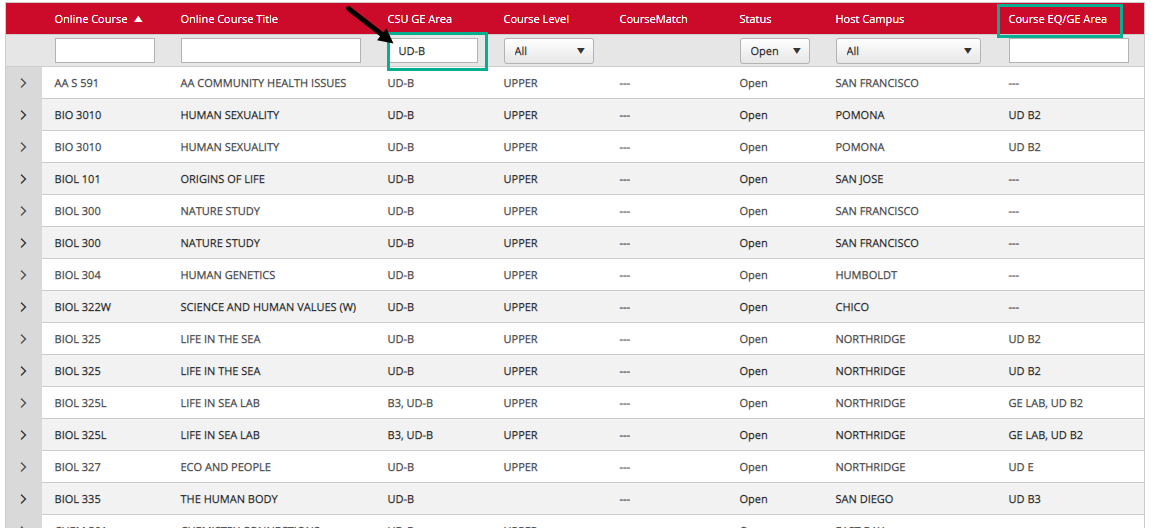
Example 2: UD-B is entered in the CSU GE Area search box. Results will show list of courses. The Course EQ/GE Area may be blank or designated with the home campus GE code that differs from the equivalent systemwide GE code.
Course EQ/GE Area: This column displays the pre-approved GE and/or course equivalency information on file with your campus. You can enter your home campus course subject code with or without the course number. GE area can be entered to search previously approved GE courses.
Example 1: East Bay home campus selected and ECON entered in Course EQ/GE Area field to search courses approved for ECON credit. Results display all courses that have an Open status and an ECON course equivalency on file. The number of results depends on previous course approvals on file with your home CSU campus.
Example 2: Fullerton home campus search using PSY subject. Listing displays only two courses with existing PSY course approvals on file.

How do I ensure the class I am taking applies to my major or transfers back for the credit I need?
If you do not see confirmation of approval on the schedule, you will need to request your campus review the course. For major specific credit a course syllabus is required for review. You can email
[email protected] for assistance with obtaining the syllabus. It will be submitted to the Articulation contact at your home campus. This process should be done well before the enrollment deadline to ensure time for review.
How do I enroll in a Fully Online course?
The Enroll in CSU Fully Online link will be made active in your student center on the first day of CSU Fully Online enrollment. That link takes you to the enrollment request page that verifies you meet all eligibility requirements then allows you to submit a request to add a course. Instructions for enrollment can be found
here.
When I log into my student portal and select Enroll in Fully Online, I get a list of classes that is much shorter than what is listed on the CSU Fully Online website. Why are there fewer courses?
Only courses that are available for enrollment on the day you access the portal will display. These include courses with available seats and are within the host campus enrollment period.
Can I take more than one course?
This program limits students to one course per semester. Exceptions are considered for lecture and lab courses that are separated into two courses. Other circumstances are considered on a case by case basis by your home CSU campus.
How do I drop my course?
You must drop the course from the host campus following their drop procedures. The welcome information provided by the host campus upon enrollment include instructions on how to drop, either by emailing a specific address or through the student portal at the host campus.
What is the deadline to drop or withdraw from a course?
The deadline is based on the dates set by the host campus.
I submitted my enrollment request. When can I expect a response?
Processing can take from 1 to 3 days. If you do not see the request status updated within 3 days, contact
[email protected] to request an update. We will follow up with the campus to determine the processing delay.
I changed my mind on the class I requested. Can I cancel or swap the class?
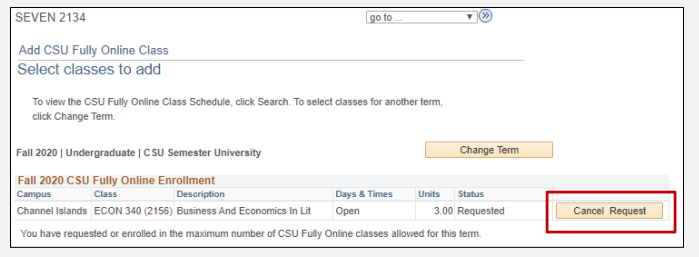
If this is done before the host campus begins processing, you may cancel your request. If the campus has begun processing, you will need to wait. If course enrollment is accepted, you must request to drop the course by the process the host campus follows. You will not be able to drop, cancel or swap through the Enroll in CSU Fully Online portal.
Example: View of requested course with Cancel Request button available. This will only display if the host campus has not yet begun to process your request.
The deadline has passed, can I still add a course?
No. Once your home campus closes access or after the host campus course enrollment period has ended, requests cannot be submitted. Exceptions may be considered on a case by case basis for emergency situations only and requires approval and manual coordination by campus staff.
Does the credit for CSU Fully Online count towards the term unit limits?
Yes, the units are included in your campus unit limits. Review your home campus website or contact an advisor to learn about academic load regulations and the process to request permission to exceed the maximum unit load.
I'm interested in completing all of my major online. How do I enroll in all online courses?
This program is not designed to complete your entire major online. If your campus does not offer the major completely online, you will need to discuss your options with an academic advisor at your campus or consider applying for transfer to another CSU campus that offers the major completely online. You can search online degrees offered across the system by filtering on the Delivery Format of Online on the
degrees.calstate.edu webpage.
My enrollment request shows a status of Not Enrolled – Other Reason. How can I find out what the reason is and still try to add the course?
The reason is usually related to unverified prerequisites or instructor permission required. Review the course details on the schedule to confirm the requisites.
If you submitted your request confirming prerequisites and would like more information about why the request was denied, contact
[email protected]. We can direct your inquiry to the host campus for assistance.
If instructor permission is required, it is your responsibility to get permission. If you need assistance with locating instructor contact information, email the following information to
[email protected]: host campus, course and course section. If you obtain permission, you will need to work with the registration staff at the host campus to re-process your original request.
Do I need to submit transcripts to transfer the grade to my home CSU?
No. You do not need to request transcripts or anything else to transfer the grade. The host campus will upload your final grade to a secure database where you home campus downloads an official grade report and uses that instead of a transcript to update your record.
When can I expect to receive credit and see the grade on my home CSU record?
The process can take up to four weeks from the final grading deadline at the host campus. Grading deadlines vary from camps to campus. Once the grade is posted at the host campus, give your home campus a few weeks to process before checking with them individually.
Can the course I take at another CSU forgive my failing grade at my home campus?
Contact your academic advisor or see your campus catalog for information related to applying courses taken at another institution for grade forgiveness.
When you say CSU students can take a free online class, does this really mean free?
If you paid your full-time tuition, the additional units for the CSU Fully Online course are included in that tuition. No additional tuition is charged. Nonresidents and international students still pay the additional fees for the units.
What is the cost for international or out-of-state students?
Nonresident and International students pay the nonresident per-unit fees for the Fully Online course. No additional base tuition is charged. Fees are charged by and paid to the host campus. Fee refunds for late drops are subject to the policies of the host campus.
Will the units taken at the other CSU campus qualify for my financial aid at my home campus?
Yes. The units for the CSU Fully Online course are included in your total term units and used for financial aid calculations.
Example: A student enrolled 9 units at home CSU adds a 3-credit course through CSU Fully Online. Total term units will be calculated as 12 and seen as full-time for financial aid.